Your Mac stays focused on your work.
Hush quietly steps back the background apps competing for CPU and memory, so the one you are in stays fast. No configuration. No account. Nothing leaves your Mac.
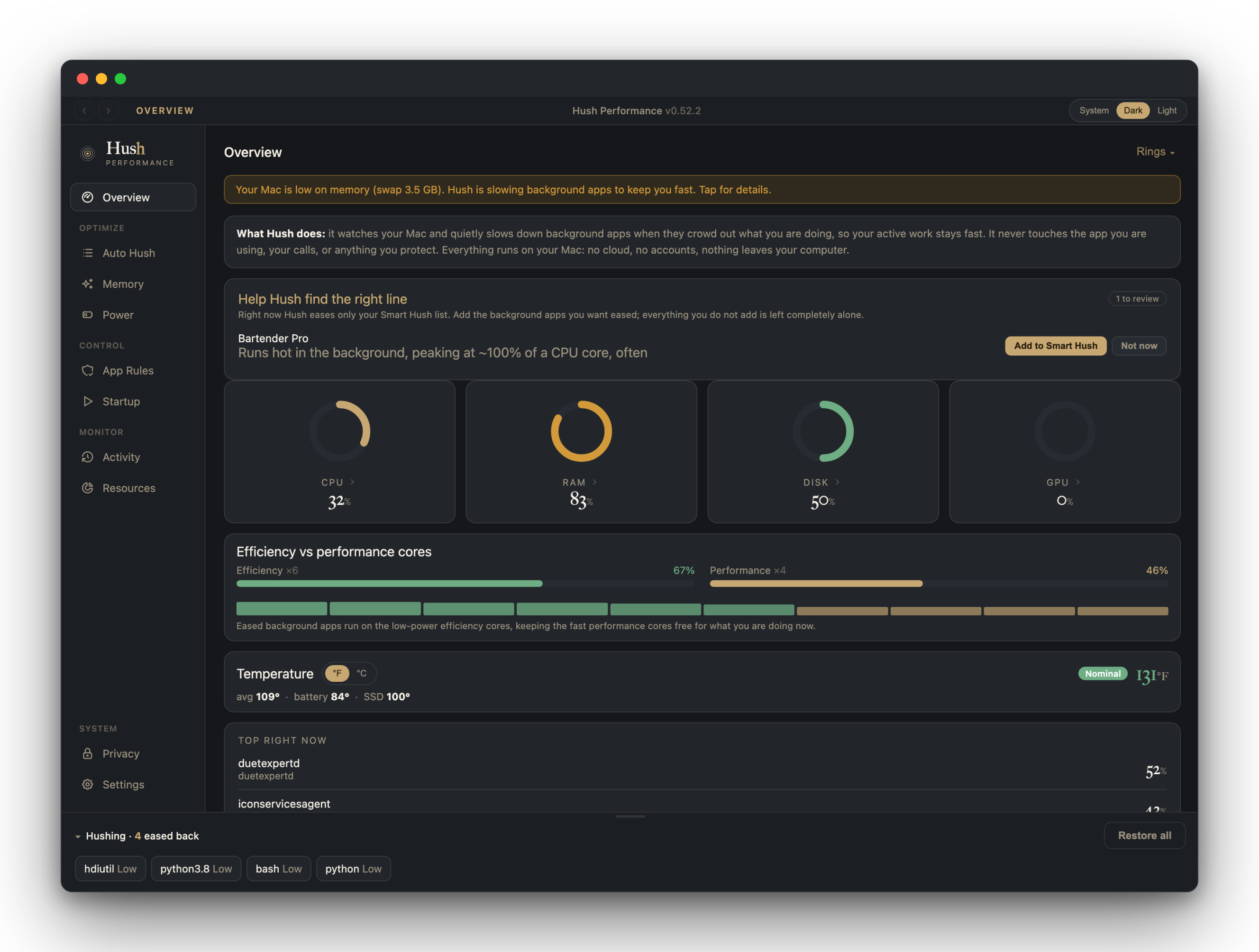
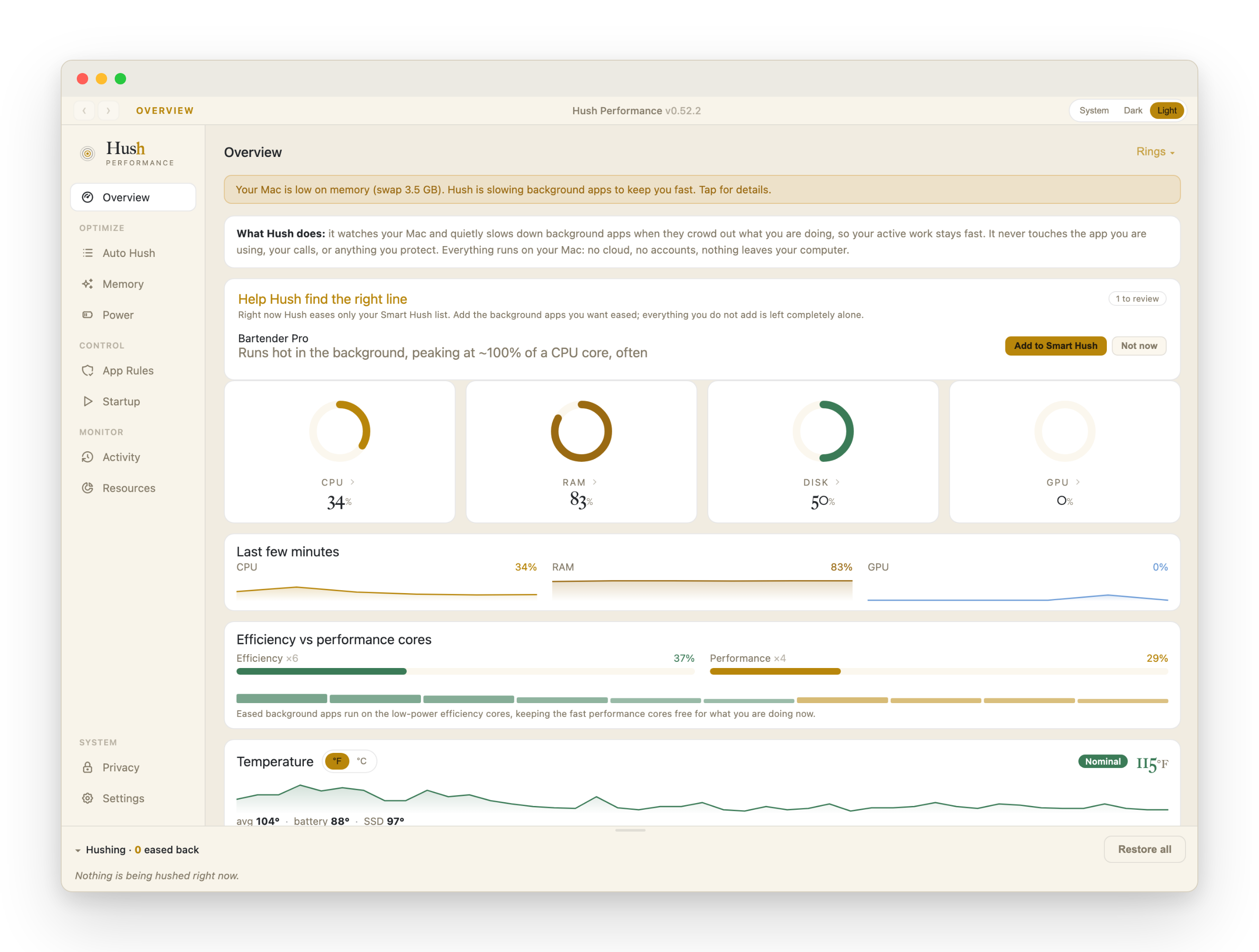
The Overview: every signal at a glance, and the background already eased back.
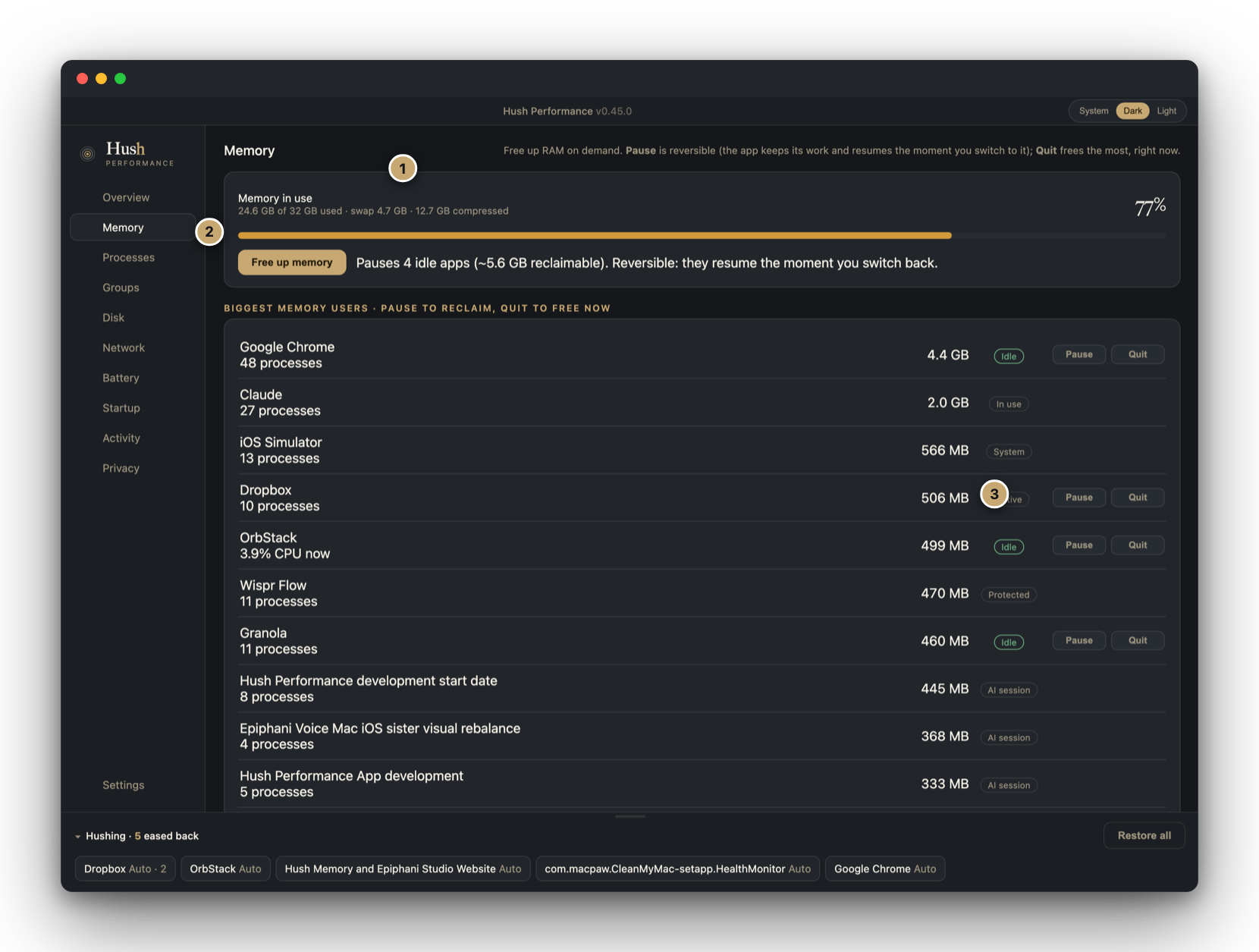
The number that matches what your Mac sees.
Hush reads memory from the same source macOS reports to Activity Monitor, and shows the parts a single percentage hides: how much is in use, what is in swap, and what macOS has compressed.
Compressed memory is not a warning. It is macOS shrinking inactive pages in place so they stay in fast RAM instead of going to disk. The gauge colors by pressure, not by a raw percentage, so a high number with a calm color reads for what it is: your Mac working efficiently.
- 1Memory, in full. Used, swap, and compressed, the same figures macOS reports, labeled rather than collapsed into one number.
- 2Free up memory, on demand. One click pauses only the idle apps that are safe to free, and shows you the measured before and after.
- 3Never the wrong app. Your AI sessions, the app you are in, and anything protected carry no action buttons. Hush cannot touch them.
Not just what is busy. What set it off.
Activity Monitor shows you a long list of processes named like WindowServer and com.apple.WebKit.GPU. Hush goes one step further and attributes each hungry process back to who spawned it: the app you opened, a background sync job, a script, or a specific AI session, resolved to its own name.
So a spike is never a mystery. You see that the load is "a Claude session and the work it spawned," or one app's helper, and you decide what to do about it, in one place.
- ▷Grouped by origin. Helpers, tabs, and child processes fold into the app or session that started them, instead of scattering down the list.
- ▷AI sessions, named. A busy automation is shown by its own title, so you act on the right one and leave the rest running.
- ▷One move from there. Ease it back, pause it, or quit the whole group, right where you found it.
When your Mac starts competing with you, Hush steps in.
When background CPU climbs or memory pressure rises, Hush eases back the processes competing with your work. Not frozen. Not quit. Stepped into the background lane, so the app in front keeps its headroom, then released the moment the pressure passes.
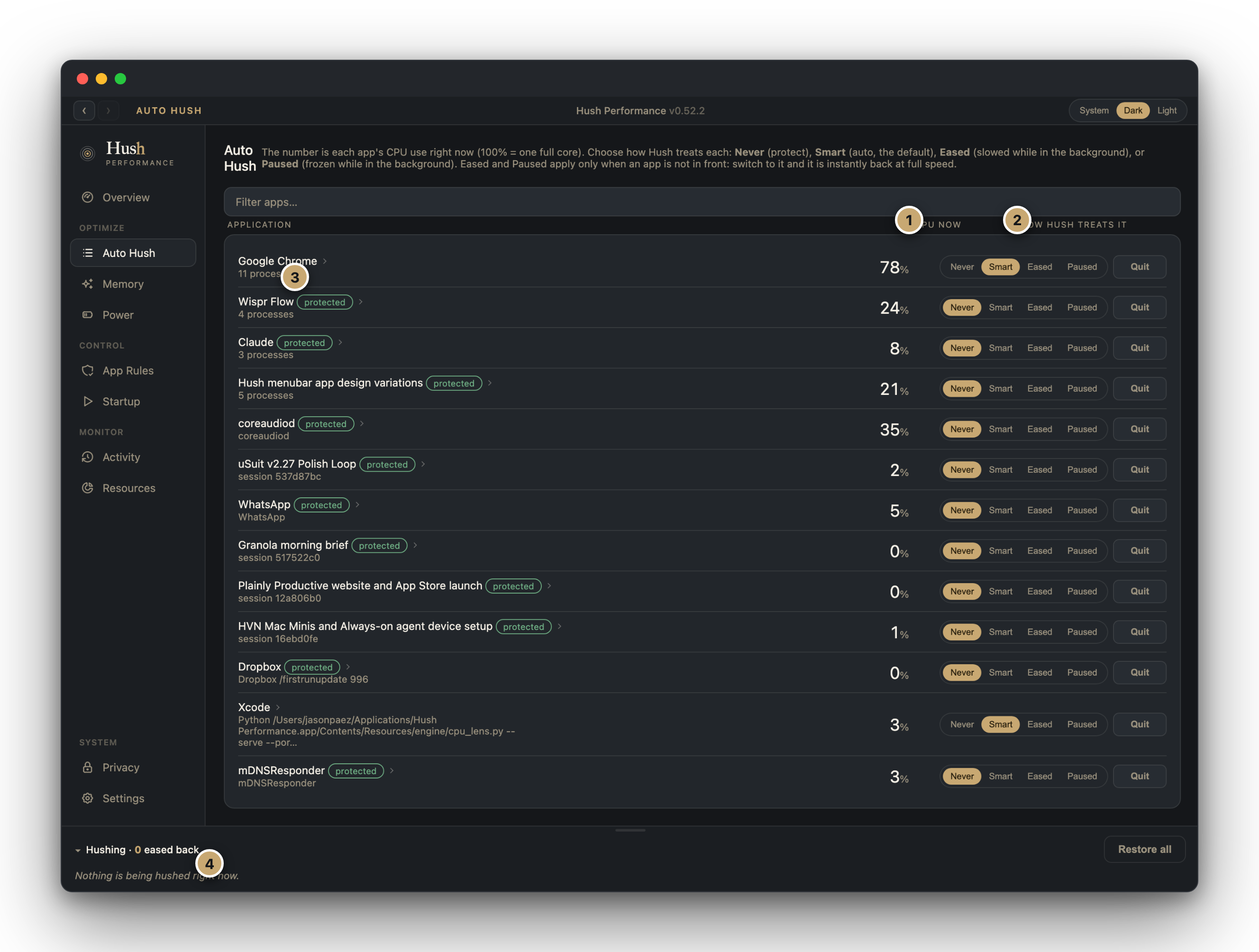
Every app shows exactly how Hush is treating it, and you can override any of it: protect an app, let Hush decide, ease it back for good, or pause it.
- 1CPU now. Each app's live processor use, where 100% is one full core.
- 2How Hush treats it. Never, Smart, Eased, or Paused, set per app. Smart is the default and does the work for you.
- 3Protected stays protected. An app you mark Never is shown plainly and left alone.
- 4What is eased right now. The apps Hush is currently holding back, visible at a glance, released automatically.
Nothing leaves your Mac.
Hush opens no connection to any remote server. Its window talks only to its own engine, on a local link that never leaves your Mac, so your performance data has nowhere else to go.
No account. No telemetry we collect. No cloud.
Smart defaults for every Mac. Full control for yours.
Hush works the moment you open it, calibrated to handle CPU and memory pressure with no setup. For those who want to see exactly what it is doing, and change it, everything is exposed and overridable.
Monitors tell you what is happening. Hush also does something about it.
Many fine Mac tools show you the numbers. Hush reads the same memory figures macOS reports to Activity Monitor, surfaces memory pressure as the real health signal, traces each spike to its source, and then acts, easing back the background so your work stays fast.
The whole picture of your Mac, in one quiet window.
Beyond CPU and memory, Hush keeps an honest read on disk, network, and battery, each from the system itself, no sudo, no helpers.
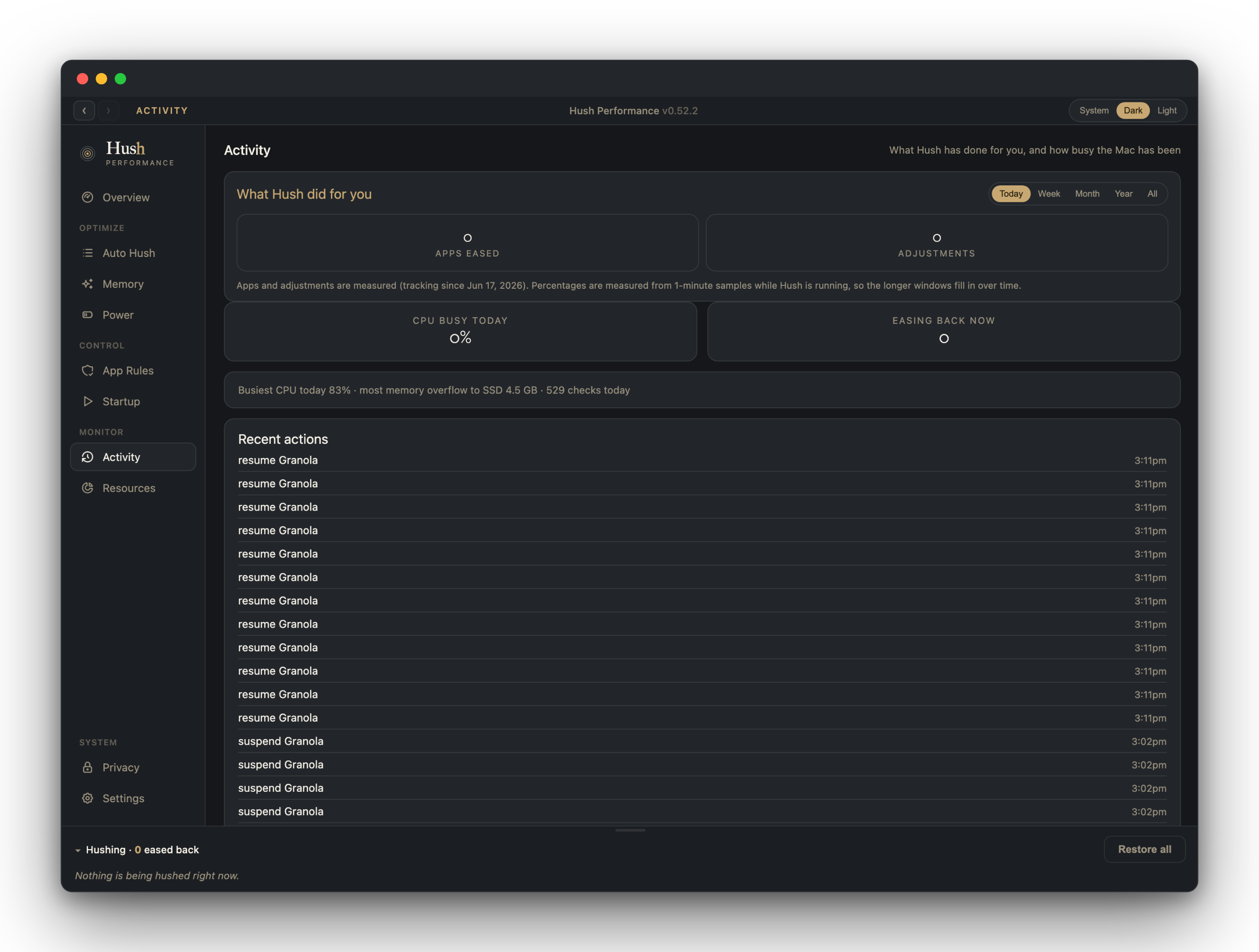
Activity keeps the receipts: every app Hush eased or restored, and when, so nothing happens off-screen.
The honest answers.
Is this another memory cleaner?
No. Hush does not flush memory to make a number look smaller. It reads the same figures macOS reports, and when you free memory it pauses only the idle apps that are safe to pause, then shows you the measured before and after. A cleaner that dumps your working set just forces everything to reload on your next click.
Will it slow down the app I am working in?
No. Hush only eases back background processes. The app in front, your AI sessions, and anything you mark protected carry no action and are left alone.
What does Hush actually do to a background app?
It moves the app into the macOS background scheduling tier, the same reversible signal the system already uses to decide what runs first. The app keeps running and stays open; it just stops competing for the processor while it sits idle. Switch to it and it returns to full speed. Nothing is force-quit.
Is high memory usage a problem?
Usually not. macOS fills RAM on purpose and compresses inactive pages in place. The signal that matters is memory pressure, not the percentage. Hush shows the pressure color so you know when a number is worth acting on, and when to leave it alone.
Can it really tell which AI session is busy?
Yes. Hush traces a process back to what started it and groups the helpers, scripts, and child processes under that source, so a busy automation shows up by its own name rather than as a dozen anonymous entries. You act on the one that matters and leave the rest running.
What can Hush reach? Does it phone home?
Hush reads only what macOS exposes to any local app, and it opens no connection to any remote server, so there is nothing to send. Open Little Snitch or Proxyman while it runs and watch the network stay quiet.
Do I have to set it up?
No. It works the moment you open it, with defaults calibrated for a normal mix of foreground apps and background load. Advanced Configurations are there when you want to see every threshold and change it.
Which Macs does it run on?
Apple Silicon, on macOS 26.
One price, no subscription?
$29, once. No account beyond your license, and your settings live in a plain file on your Mac. If Epiphani disappeared tomorrow, Hush keeps running.
Buy it once. It runs on your Mac for as long as you need it.
No subscription. No account beyond your license. No cloud dependency. If Epiphani disappeared tomorrow, Hush keeps running, and every setting stays in a plain file on your Mac.